Fast, private cloud storage
Fast, private storage for people and their agents
Files go straight from your machine to the storage node, never through a web server. Open the drive in Finder, File Explorer, Linux, the browser, or from any agent over MCP or HTTP. No email, no password, no card.
One click creates a random 16 digit account. Save the number; add MFA when you want it.
- Direct to storage
- 1 TiB per file
- No signup form
- Free during launch
The data path
Your bytes never pass through the application server
Most drives relay every file through their own servers, so speed is whatever their relay can afford. Yogfile is built the other way round.
- 01
Authorize
The client asks for a short lived grant bound to the content. Credentials never travel inside the file body.
- 02
Transfer direct
The upload or download goes to the Nauka storage node. The Yogfile API checks the request and keeps the namespace consistent; it never relays the bytes.
- 03
No speed cap
Yogfile sets no per connection rate limit during launch. Distance and your network still apply.
- 04
Local hot path
Native clients fetch ranges on demand and cache what you use often, so opening one file never means pulling the whole drive.
Your files never touch our servers.Your name never enters our database.
The drive
One set of files, wherever you open it
A drive has a short stable ID like x7k2p9, real folders, kept versions, and a Trash you can recover from for 30 days. There is one source of truth, and every client sees the same paths.
A real filesystem
Mount it in Finder, File Explorer, or Linux, or use it in the browser. Same folders, same files.
Agents that keep state
An agent writes to the folder you open on your desk. The next run, with any model, starts from what the last one left.
Private or public
Put a passphrase on a drive when its listing should stay private. A public drive is unlisted, not secret: whoever has the ID can browse it.
Nothing about you
A 16 digit number is the whole account. No email, no profile, no card, and no directory to be found in.
How it works
Three steps, the first one takes a click
01
Open a drive
One click creates a random 16 digit account and a first drive. Save the number in a password manager; it is the only credential there is.
02
Add files from anywhere
Drag them into the browser, drop them in the mounted folder, or let an agent write them over MCP or HTTP.
03
Share only what should leave
Each file has its own share page. Move it to Trash and the page closes at once.
Native clients
Use Yogfile like a drive, not a browser tab
The same files appear in Finder, File Explorer, Linux file managers, and the web. Native clients fetch by range, keep the hot set cached locally, and pick up web changes without a manual refresh.
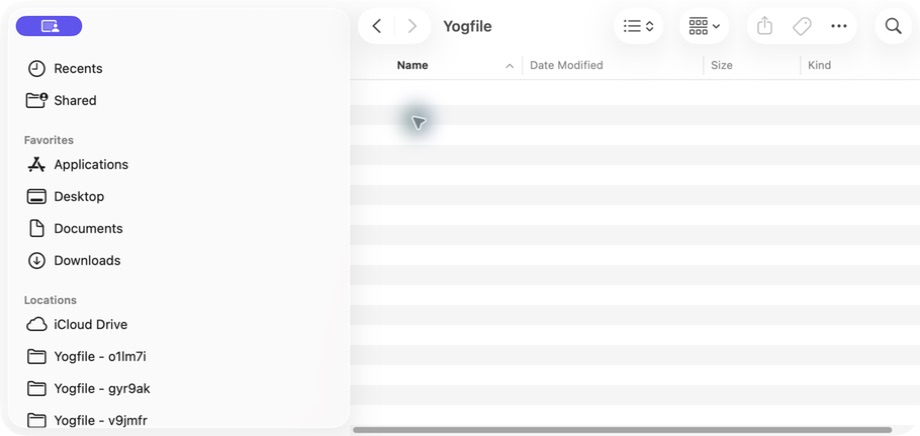
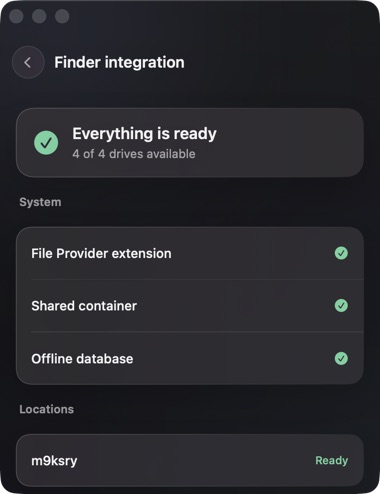
Native File Provider
Fast files, right inside Finder.
Every Yogfile drive gets its own Finder location. Files arrive on demand, frequently used data stays in the local cache, and changes from the web or another machine appear without a manual refresh.
- Finder sidebar
- Local cache
- Files on demand
Private preview · macOS 13+
Agents are first class clients
The same drive, over MCP or HTTP
Add one hosted connector to Claude, Cursor, VS Code, or any MCP client. Anything else, a custom runtime or a plain script, uses the public HTTP API and gets the same namespace and the same direct transfer path. One agent writes, another reads: the folder is the handoff, and the storage belongs to the account, not to a model vendor or a chat session.
Seven tools
create_accountlocal binary- : one random 16 digit credential, no email behind it.
create_drive- : a persistent namespace with a short ID, public or behind a passphrase.
create_folder- : a path like reports/2024/q3; missing levels get created together.
upload_file- : writes content to a path and returns a share page.
share_link- : a signed URL that downloads immediately.
list_files- : the same drives, folders, files, and sizes every other client sees.
delete_file- : goes to Trash. The share page closes at once.
Errors come back as {code, message, hint}, so an agent that fails knows what to try next.
Connect in one step
Run this
claude mcp add --transport http yogfile https://mcp.yogfile.com/mcp
The first storage call opens a page to connect your drive account or create one. Nothing to install, and the same files remain available outside Claude Code.
One agent session
> upload the build and share a link
uploaded   app-v2.dmg   48.2 MiB
drive      x7k2p9/releases
link       yogfile.com/f/8c41…
kept       until you delete it
An example session, not a benchmark.
Privacy
An account with no identity attached
Yogfile never asks for a name, an email address, a password, or a card. We keep the metadata needed to run the drive, and nothing about who owns it.
- Minimal identity
- No email login, social identity, contact list, ad profile, or card.
- A credential you can harden
- The number works on its own by default. Optional MFA adds a TOTP authenticator and ten recovery codes; keep them offline.
- No public directory
- No cross account search, no index. A public link is still public to whoever receives it.
- End to end file contents
- New drives created by the web, macOS, and Linux clients encrypt every file before transfer. The servers store opaque NKA1 bytes. Metadata remains visible, and legacy or compatibility drives stay clear until their owner migrates them.
Data flows and retention periods are in the Privacy Notice →
Underneath
An open storage engine you can read
Yogfile runs on Nauka, an open source AGPL storage engine built by SYFRAH CONSULTING, engine first, product second. Nauka and the Yogfile MCP server are public source; the Yogfile API and web application are not. The launch deployment is one physical server in Helsinki, and there is no second site yet.
- Reed Solomon 4+2
- Six shards, any four rebuild the file. Today they sit on one server, so this protects integrity, not against losing the machine.
- BLAKE3 content addressing
- Content is verified by hash, and byte identical uploads can share one stored object.
- Built for regional nodes
- Authoritative geo DNS lives in the engine, so clients get routed closer as regions are added.
- A thin product layer
- Yogfile holds accounts and namespace metadata. Nauka holds the bytes.
Launch pricing
Free while we launch, no card, no checkout
There is no hidden meter. The ceilings below exist to stop runaway use, not to bill you. If paid plans come, the price will be published before anything is charged. These are the limits enforced today; hit one and the API says which, and by how much.
- Storage
- 1 PiB
- Per account. A ceiling, not a bill.
- File size
- 1 TiB
- Per file. Big enough for a disk image or a raw capture.
- File lifetime
- Yours to set
- No expiry unless you ask for one.
- Drives
- 1,000,000
- A safety ceiling. Nobody should get near it.
- Monthly egress
- 1 PiB
- Downloads are not billed.
- Speed per connection
- Unlimited
- Your network and your distance to the server still count.
- Connections per link
- 2
- So one link cannot quietly become a mirror.
- Signup form
- None
- A 16 digit number instead of a profile.
Before you rely on it
What Yogfile is not, today
Not a backup. One physical server, no second site. Keep another copy of anything you cannot afford to lose.
Not encrypted metadata. Drives created on the web, macOS, Windows, and Linux encrypt file contents in the client before upload, so Yogfile and Nauka cannot read those bytes. File names, sizes, types, timestamps, and folder structure remain visible. Legacy and compatibility drives stay clear until their owner migrates them.
Not recoverable. Lose the 16 digit number and the account is gone, for us too. Recovery codes replace a lost authenticator, not the number. The number is a bearer credential; MFA is what protects it.
Not a team workspace. No memberships or permission matrix yet. A drive belongs to one account and is shared by link or passphrase.
Questions
The ones people ask first
Is this only for AI agents?
No. Yogfile is a normal drive on the web and in Finder, File Explorer, and Linux. MCP and HTTP make agents clients of that same drive rather than a separate product.
Does it only work with Claude?
No. The connector is plain MCP, so Claude, Cursor, VS Code, and any compatible client can use it. The public HTTP API reaches the same drive from anything else, including a shell script.
How fast is it, really?
There is no relay and no rate cap, so the limit is the path between you and the Helsinki server: distance, your network, your device, the file size, and how you read it. Native clients fetch by range, so opening one file never means pulling the drive.
Can anyone find my files?
There is no search or directory across accounts. But public by link is public: anyone with a file URL can open it, and anyone with an open drive ID can browse it. Put a passphrase on a drive when its listing should stay private.
What if I lose my account number?
The account is gone, and nobody can bring it back, including us. There is no email reset. Save the number in a password manager the moment it is created.
How do I protect the account?
MFA is off by default, so the number alone opens the account until you turn it on. Add a TOTP authenticator and save the ten recovery codes. Lose the number, the authenticator, and the codes, and support cannot help.
Do files expire?
Not unless you say so. A file uploaded today is still there next year. Set a lifetime on a drive or on one upload when something should not linger, and Yogfile enforces that date to the second.
What does it cost?
Nothing during launch. There is no checkout and no hidden meter. If paid plans come, the price will be published before anything is charged.
What is the catch?
Free during launch, one physical server, no geographic redundancy yet, and two simultaneous connections per public link. Keep a second copy of anything irreplaceable.
Open a drive. Bring your agents.
One click, no email, password, or card. Use it from the web, your filesystem, MCP, or HTTP, and share only what needs to leave.